
The Line 6 POD Go is already a very capable unit straight out of the box, but a few small changes can make it feel and sound noticeably better. In this post, I’ll share five practical tips that helped me get more out of my Line6 POD GO both at home and on stage.
We’ll look at turning on the guitar input pad, trying a buffer before the input, using custom impulse responses, placing a compressor at the end of the signal chain, and trying presets made by other users.
1. Turn Guitar Pad In On
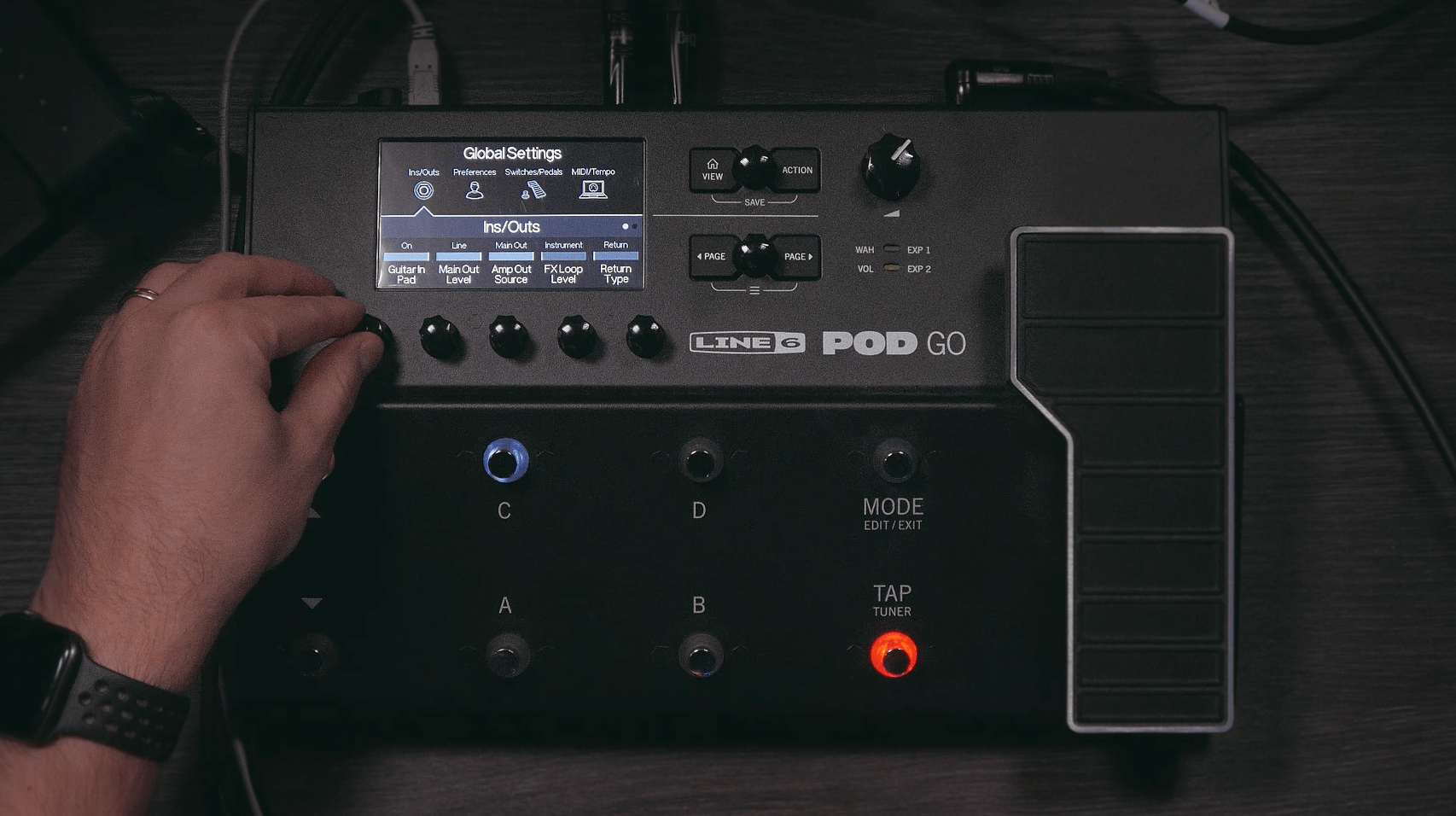
If you are using a guitar with high-output pickups, or if your amp tones in the POD GO start distorting too quickly, the first thing I would try is turning on the Guitar In Pad in the global settings.
To access the global settings, press both Page buttons at the same time, then press the rightmost selector below the screen. In the lower-left corner, you will see the Guitar In Pad setting. Turn it on by rotating the selector below it.
This applies a -6 dB pad to your guitar signal before it hits the rest of the signal chain. In practice, that can help you get more usable clean tones and more predictable gain staging, especially if you are using hotter pickups.
2. Try a Buffer Before the Input
One of the more talked-about POD GO tips is using a buffer before the guitar input. Some users feel that the POD GO input slightly dulls the signal, especially in the top end. I decided to test that for myself by placing a buffered tuner in front of the unit.
I used a Peterson Strobostomp HD, which has a very good built-in buffer.
Did it make a huge difference? Not really. But I did hear and feel a small one. The signal seemed a bit more immediate, and there was a little more clarity in the high end. That said, I had happily used the POD GO before ever thinking about this, so I would not call it a must for every player.
If you already own a buffered tuner or pedal, it is an easy thing to try. If you use the POD GO Wireless, this may not be an issue for you in the first place.
3. Use Custom Impulse Responses
If I had to recommend just one of these POD GO tips to most players, it would probably be this one.
Your cabinet has a huge effect on your overall guitar tone, and custom impulse responses can make a big difference. While the stock cabinet options in the POD GO are usable, I personally never found them to be the most inspiring part of the unit.
A good IR can simplify the entire tone-building process. Instead of moving virtual microphones around and second-guessing every tiny change, you can load in a well-made IR and get to a polished tone much faster.
That is especially helpful if you would rather spend your time playing, recording, or rehearsing than endlessly tweaking. A quality IR pack can help the POD GO sound more mix-ready with less effort.
4. Put a Compressor at the End of the Signal Chain
This was one of the most surprising tricks I tried with the POD GO.
Instead of placing a compressor near the front of the chain, try putting one at the very end. I first saw Rhett Shull talk about this approach, and after testing it myself, I understood why it works.
One of my main complaints with many modelers is that they do not always feel quite as responsive as real amps. Adding a compressor at the end of the chain helped the POD GO feel more polished and a bit more natural under the fingers.
I use the LA Studio Comp for this, and I do not set it aggressively. The goal is not to squash the tone, but to add a bit of glue and smoothness while improving the overall feel.
Some players will still prefer placing compression earlier in the chain, and that is perfectly valid. But if your POD GO feels slightly stiff, this is a very good trick to try.
5. Try Presets Made by Other Users
Another easy way to get more out of the POD GO is to use presets made by other players.
This can save a lot of time, especially when you are dealing with amp models that are harder to dial in. Some amps have very interactive controls, where changing one setting affects several others. If someone has already spent hours building a good preset around that amp, buying or downloading that preset can be a smart shortcut.
It is not just about speed, either. Sometimes another person’s preset can push you toward sounds you would never have created on your own. I have definitely found tones that inspired me to play differently or write things I would not have come up with otherwise.
If you enjoy building every sound from scratch, that is great. But if you want faster results and fresh inspiration, presets can be a genuinely useful tool.
Is The Line 6 POD GO Good?
Yes, I think it is.
I liked the POD GO from the start, but these tips helped me get even more out of it. I used it both in the studio and live on stage, and it proved to be a simple but flexible unit that could cover a lot of ground.
For me, the biggest improvements came from using better impulse responses and experimenting with compression at the end of the signal chain. Those two changes made the POD GO feel easier to enjoy and easier to dial in.
If you are interested in getting your own POD GO and supporting what I do, you can find my affiliate links below.
►►Get Your POD GO At Thomann: https://thmn.to/thoprod/483547?offid=1&affid=394
►►Get Your POD GO At Sweetwater: https://www.sweetwater.sjv.io/5ga6do
►►Download My POD GO Acoustic Patch And The Jam Track: https://www.catpickstudios.com/
Leave a Reply
You must be logged in to post a comment.